LaTeX Studio: group work in LaTeX, with versions, without having to know Git
Executive summary
- What it is: a collaborative LaTeX editor in the browser, free and open source (AGPL-3.0). It runs for a limited time at latex.fasorx.com.br, with a FasorX account, and the code stays on GitHub.
- Who it is for: students who write their LaTeX assignments in groups without knowing Git, and colleges that want to offer the tool to their students.
- Why: in Brazil, Overleaf's student plan costs R$ 25 a month (R$ 21 on the yearly plan), which may not be affordable for some students, and the free plan allows one collaborator per project and keeps only 24 hours of history.
- What it does: simultaneous editing with comments, named versions with co-authors, kept in Git without anyone having to know it, and three ways to find your way around the work: a map of the sections, a list of figures, tables and equations with previews, and a topic graph.
- On the local network: one student runs LaTeX Studio on their own computer and shares the project with classmates on the same network, who edit in the browser, even on a phone, with a PIN.
- Time and cost: about 44 hours over 13 days and about US$1,730 at API prices. That is not what I spent, since I used a subscription plan.
Did the summary catch your interest? Then keep going, the rest is for you. If it didn't, feel free to stop here: the essentials are up there, and your time is worth more than my text.
What it cost, in hours and tokens
I built LaTeX Studio entirely with Claude Code, in 378 commits, and today it has more than 600 automated tests. The time and cost below come from Claude Code's own logs.
The dollar amount in this section is not what I spent. I used a subscription plan, which is much cheaper. The number shows what the same work would cost paying for the Anthropic API by usage.
Time
It took about 44 hours of work over 13 days, from October 2 to 19, with 196 requests. Of those hours, between 8 and 14 were mine, reading responses and writing requests; the rest of the time, the agent worked on its own. I only counted stretches with activity, leaving out pauses longer than 10 minutes. Allowing pauses of up to 30 minutes, the total comes to about 53 hours.
Where the time and money went
By kind of work, the requests split like this.
| What I was asking for | Requests | Time | Cost (API) |
|---|---|---|---|
| Building features | 55 | ~20 h | US$760 |
| Refinements and fixes, including code reviews | 69 | ~13 h | US$401 |
| Security: reviews, fixes and production | 21 | ~4 h | US$210 |
| Deployment, publishing and PRs | 26 | ~7 h | US$202 |
| Environment and local server | 13 | ~2 h | US$89 |
| Comparison with the original Overleaf | 8 | ~1 h | US$51 |
| Documentation | 4 | ~0.5 h | US$15 |
| Total | 196 | ~48 h | ≈ US$1,730 |
The table's total goes past 44 hours because it adds up sessions that sometimes ran at the same time. The comparison with Overleaf meant compiling projects from my account in both editors to check errors and warnings. And security cost more than its 4 hours suggest because the reviews ran in subagents, several at once, each one spending tokens while the clock counted a single session.
Tokens
It came to about 3.35 billion tokens, 98.4% of them cache reads, because with every response the model rereads the whole conversation. That rereading costs a fraction of the normal price and still took about two thirds of the bill. The text the model actually wrote, code included, added up to only 6.1 million tokens. Almost everything ran on Claude Opus 4.8, with 58% of the cost, Opus 5.5, with 28%, and Fable 5.1, with 13%.
How I got these numbers
The prices are the ones in the table Claude Code itself uses for the /cost command, the same as the API's (Opus 4.8, for example, costs US$5 per million input tokens and US$25 per million output tokens, and Opus 5.5, US$4 and US$20). In a session where Claude Code saved its own bill, mine came out 1.7% above it, so allow a margin of about 2%. Each response was counted once, subagents were counted under the request that called them, and the requests were classified by hand. Conversations on claude.ai and the requests for this very post were left out.
Why I built LaTeX Studio
In many programs, the undergraduate thesis, the dissertation and many of the reports are written in LaTeX, and almost always by several hands. In practice, that tends to become files passed around by email, versions with names like final-for-real.tex and someone losing a classmate's work. Git would solve version control, but it asks for what most students never learned: commits, branches and the terminal.
Overleaf solves much of this. Even so, in October 2026 the student plan costs R$ 25 a month in Brazil, or R$ 21 a month on the yearly plan, which may not be affordable for some students. The free plan allows one collaborator per project and keeps only the last 24 hours of history, which is little for a group of three or four people writing the same paper over a semester. Overleaf has Git integration, but version control does not live inside the project: commits are made in a clone, outside the editor, which again requires someone to know Git. And on every plan, each upload is limited to 50 MB.
The idea of LaTeX Studio is that students can write and compile their work with Overleaf's main features, for free, with version control that works without anyone having to know Git. Size limits are set by whoever installs it, instead of a fixed 50 MB cap. And since the code is open, it can also serve as a base for a college to run its own LaTeX editor and offer it to low-income students, who need these features but cannot pay for a subscription.
The screens throughout this post come from a fictional undergraduate thesis written just for the examples, with the interface in Portuguese.
Versions without having to know Git
Every project is a Git repository, but the people writing it do not have to deal with Git. The editor saves the text as you type, and that autosave does not create versions. A version is only created when someone asks for one: Ctrl+S creates a version of the open file, and the "Salvar versão" (save version) button creates one with the chosen files and a short message about what changed. Whoever edited those files since the previous version becomes a co-author.

The Changes tab shows what was altered since the last saved version, with the list of modified files and a side-by-side comparison. The History tab lists every version, compares any two and restores a file or the whole project, without disconnecting anyone who is editing and without losing the comments. You can also see the history of a single file.
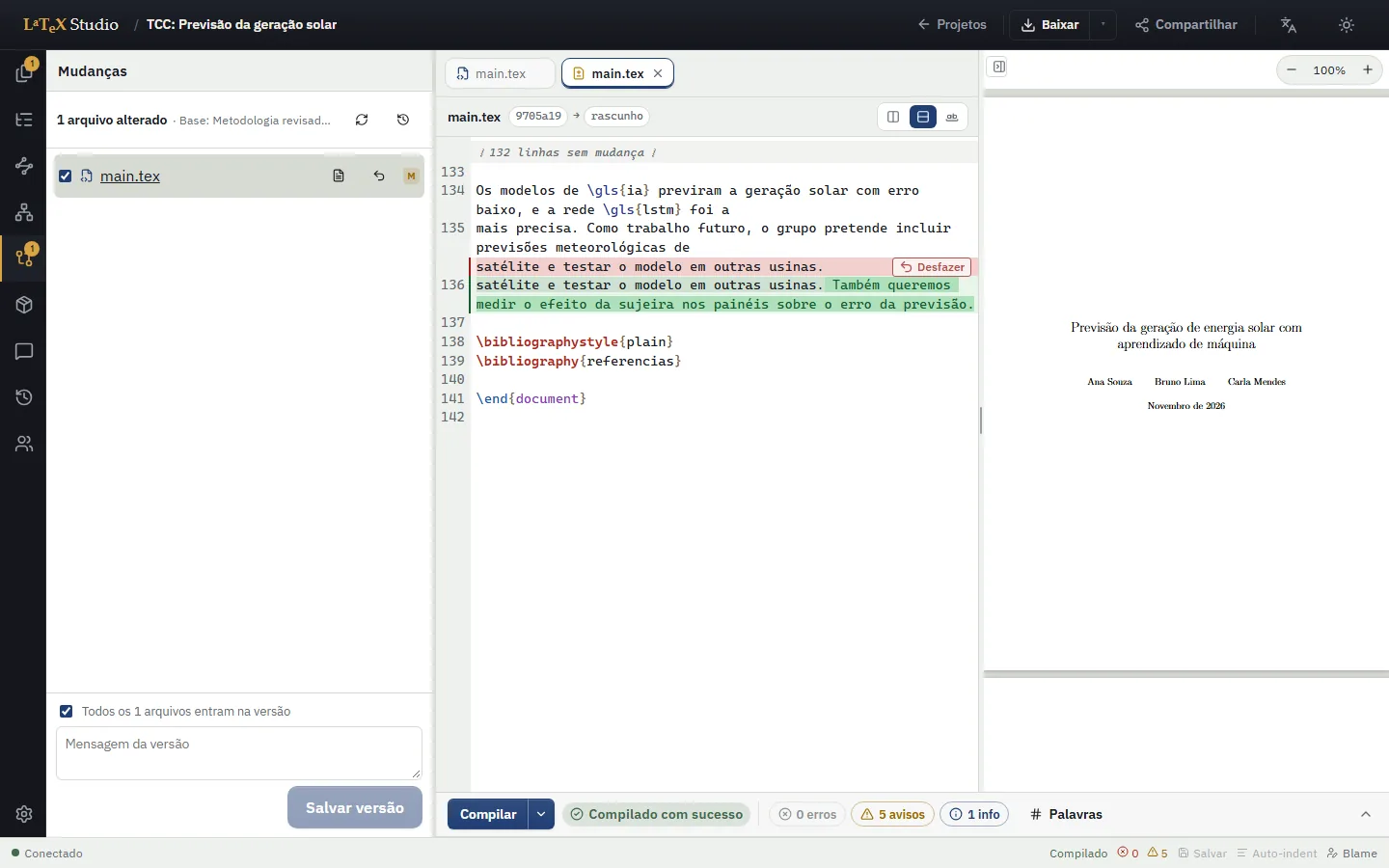
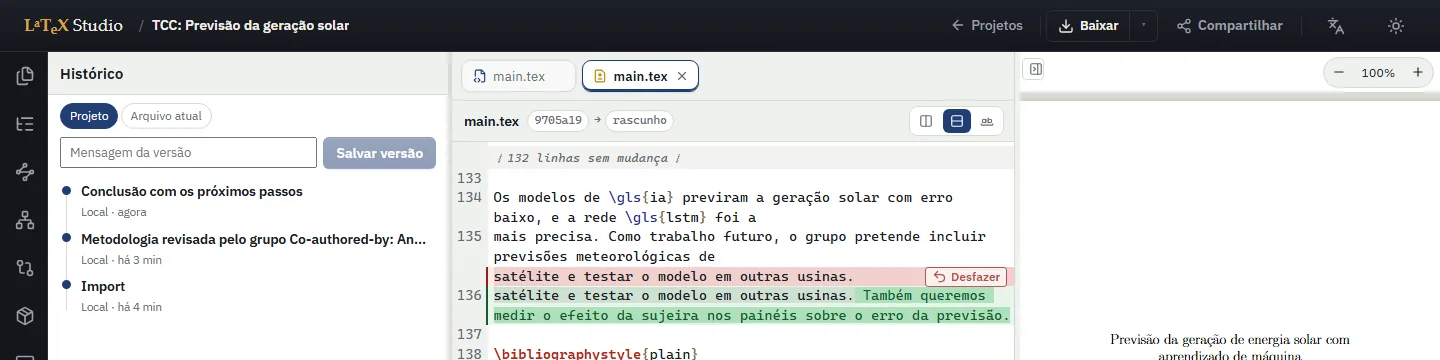
In my view, this is where LaTeX Studio differs from Overleaf. The history is made of versions someone created on purpose, with a name and co-authors, not of a string of autosaves, so it shows the stages of the work and what each person wrote.
Writing as a group
Several people can edit the same file at the same time, as in Google Docs, and each one shows up with their own cursor, name and colour. Lines changed since the last version are marked in the margin with the colour of whoever last edited them, and the Blame button, in the status bar, shows next to each line who wrote it and how long ago. Comments stay attached to the passage they are about and stay in place when someone edits the text around them.
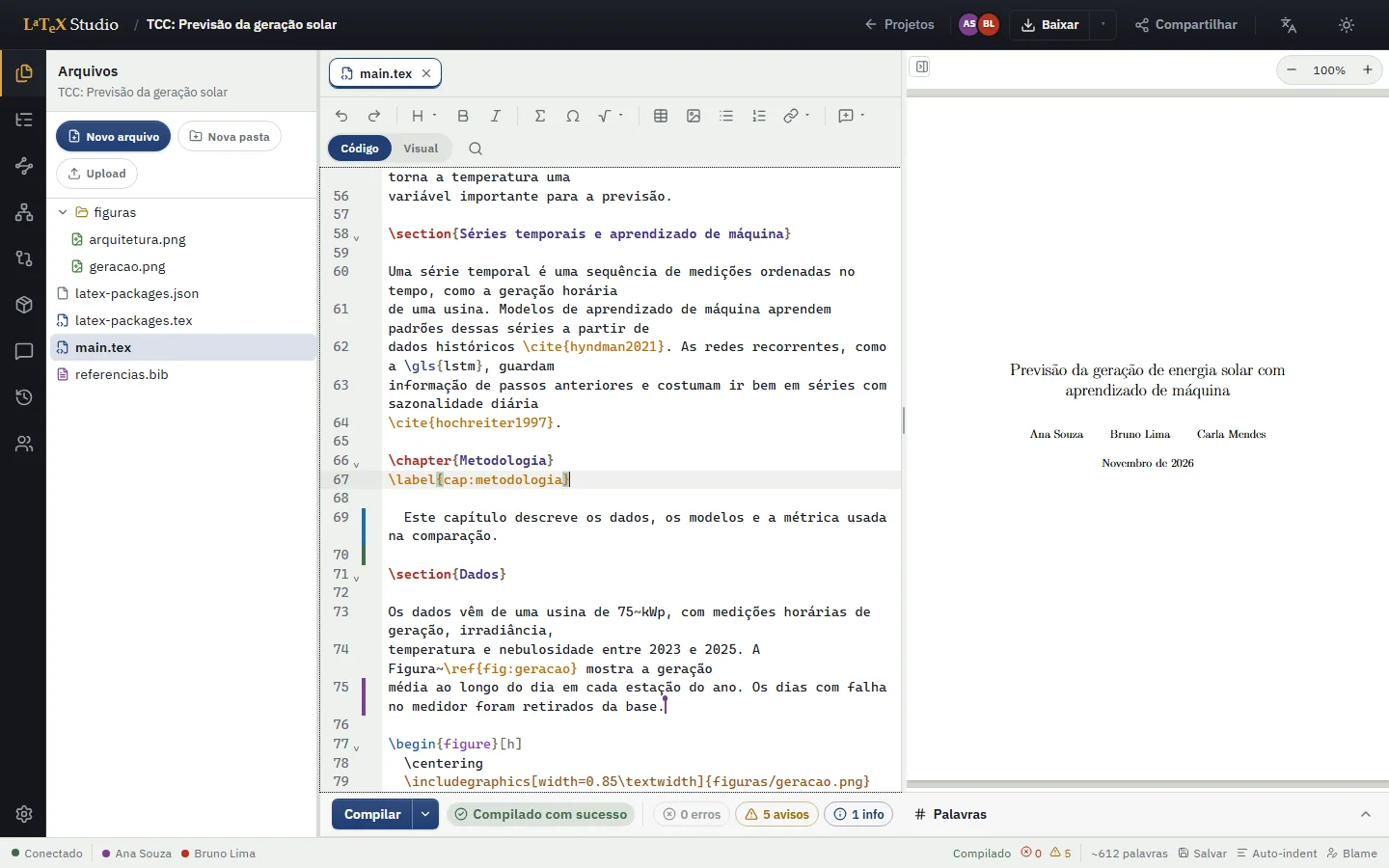
Sharing works by invitation, with four roles: the owner, the editor, the reviewer, who only reads and comments, and the viewer. The reviewer is the role I had in mind for the advisor or the teacher, who follows the work and comments without touching the text.
What I added to find your way around the work
An 80-page paper is hard to get around through the code alone. That is why the sidebar gained three views. The map draws the paper's sections and chapters as a mind map, and each node takes you to the matching line in the code. The outline lists the project's figures, tables, equations and acronyms, shows a preview of each one (the image, the table or the equation already rendered) and has a button to jump to its code. And the topic graph draws around the document the areas it covers and the terms in each of them, and updates as the text grows.
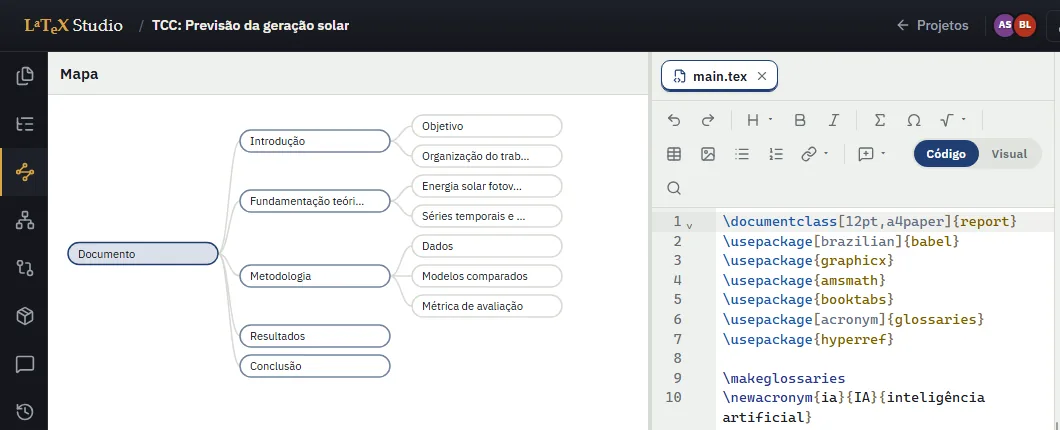
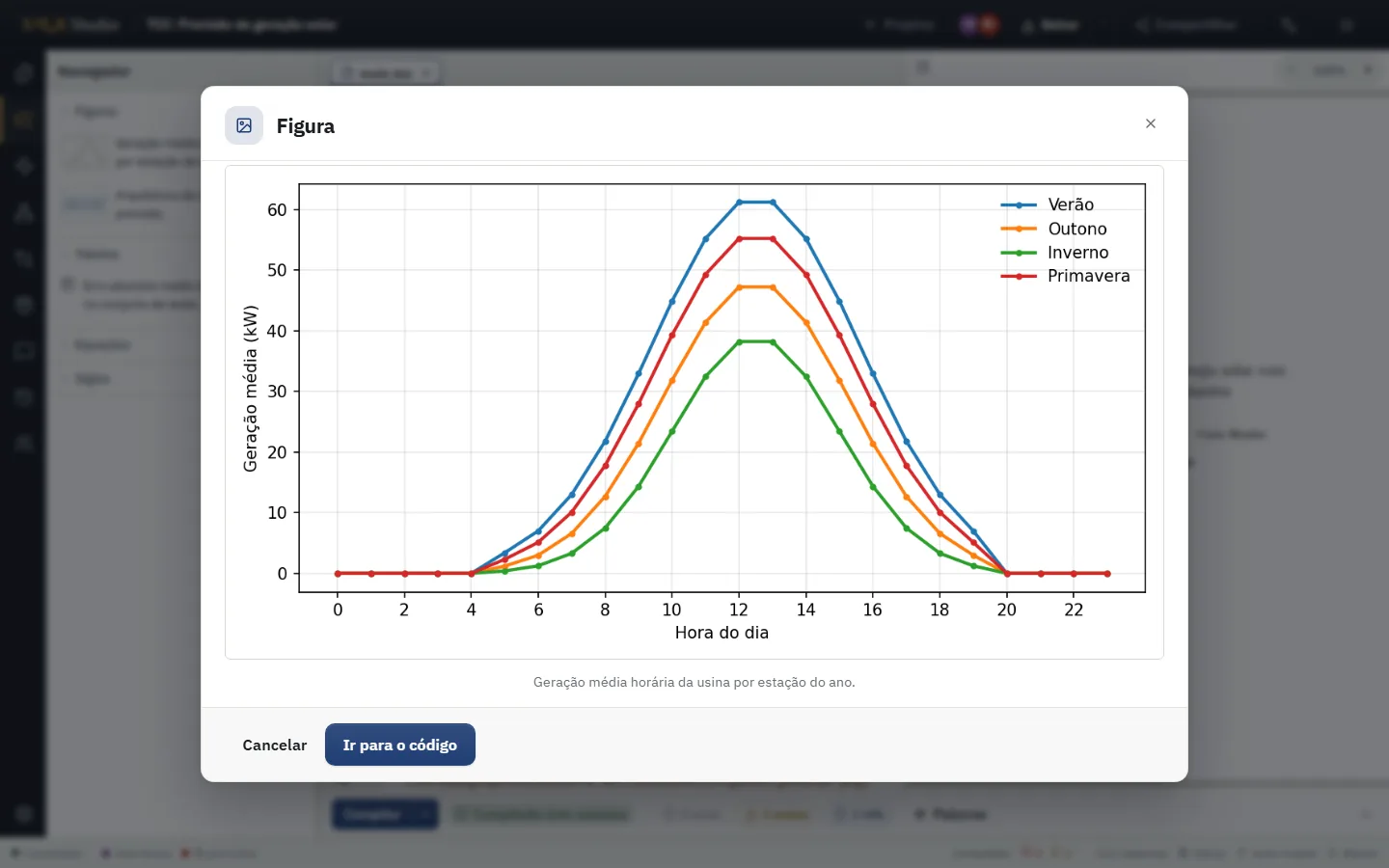
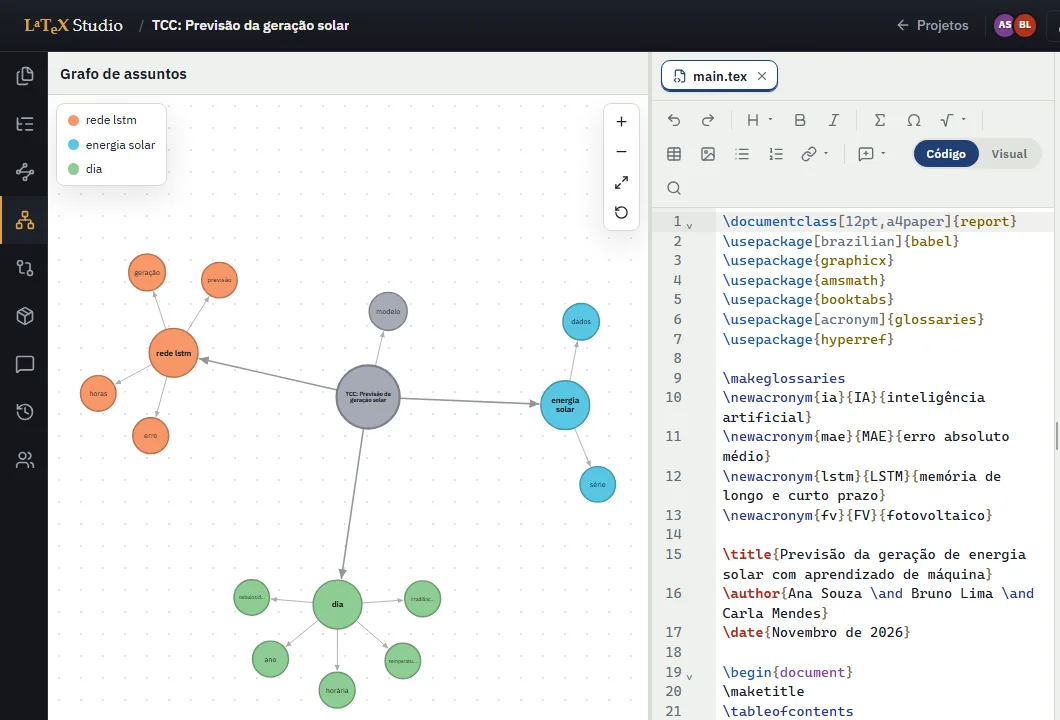
In the editor, Ctrl+click on a \ref or a \cite takes you to where the label or the reference was defined. LaTeX packages live in a panel, with a switch to turn each one on and off, with no need to comment out one \usepackage after another when the document stops compiling. There is also a spell checker in Portuguese and English, automatic code formatting, a palette of math symbols, a table assistant, a word count and export to PDF, Word, Markdown and HTML, for when the committee asks for the text in Word.
Sharing on the local network
LaTeX Studio also runs on one of the students' computers, and classmates on the same network edit the project in the browser, with no separate server. The host needs Docker, Node and the downloaded code; the pnpm lan command sets up the rest, and the only thing left is opening the firewall. Then, on the home screen, the host switches remote access on, publishes the project and creates a 4-digit PIN for each classmate.
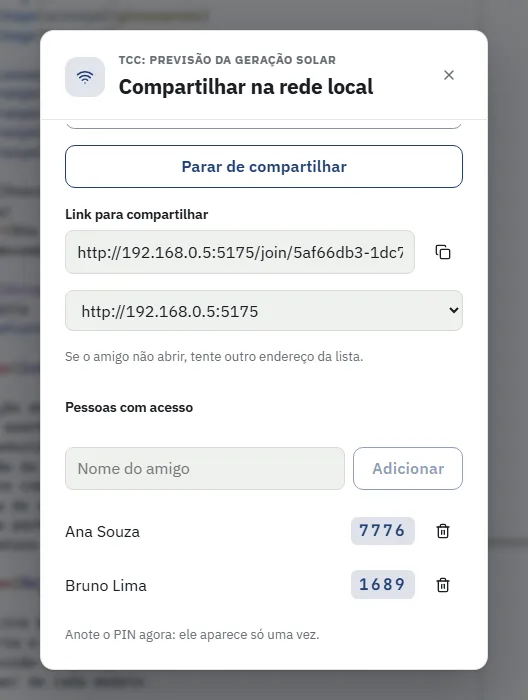
The classmates open the link on a laptop or a phone, type the PIN and edit the project together with the others. Nobody needs to create an account, and the files stay on the host's computer.
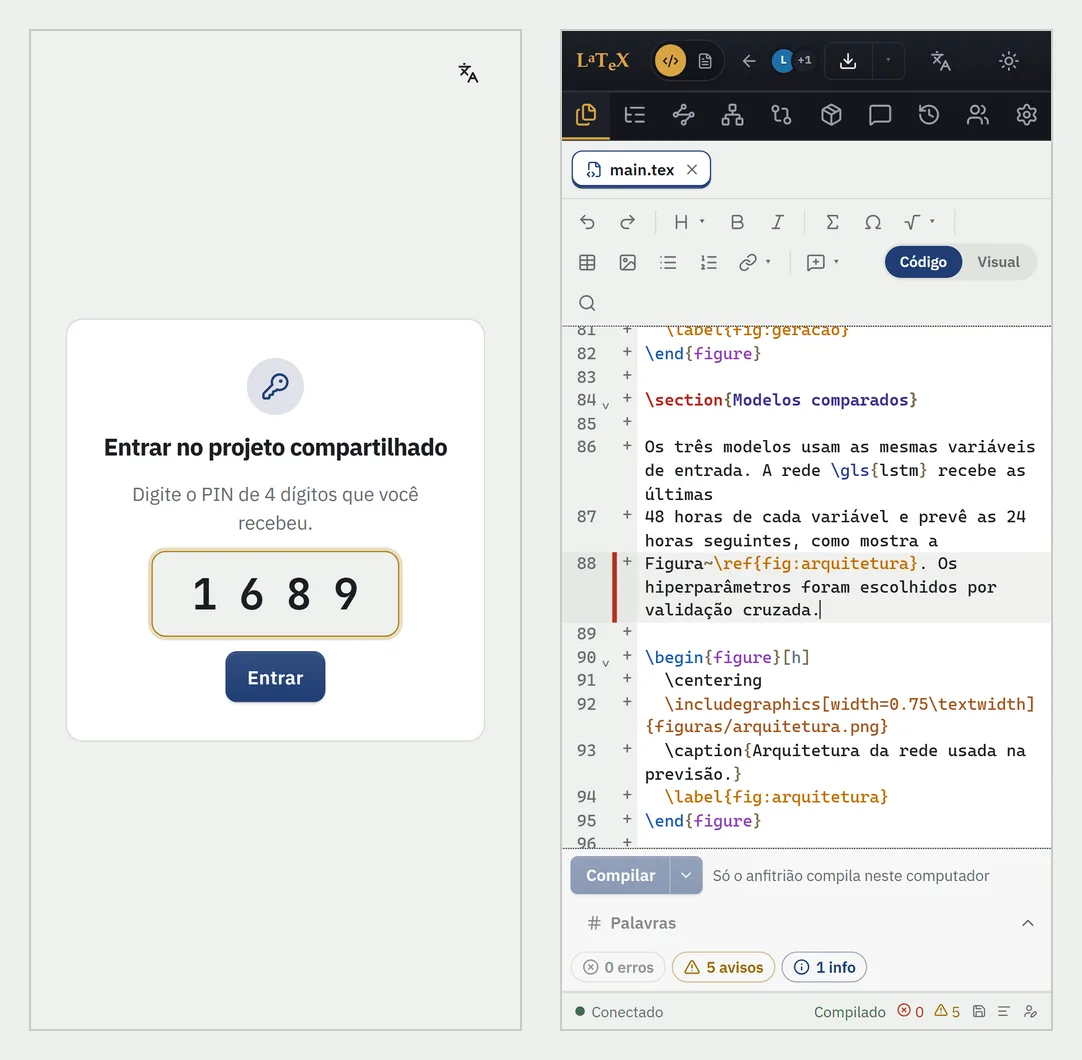
The PIN is a convenience for classmates who trust each other, not a real login. On a Windows computer only the host compiles, and the classmates see the new PDF within 10 seconds. The details are in the README.
For colleges
A college can install LaTeX Studio on its own server, with a Docker Compose, and the login is the one it already uses: any OIDC provider, such as Entra ID and Keycloak, and Active Directory through ADFS. The work stays on the college's server, with storage quotas per project and per user, and the full TeX Live already ships abnTeX2, for those writing to the Brazilian ABNT standards.
The reference is a VPS with 2 vCPUs and 4 GB of memory for about 100 users. In that setup, compiles go into a queue and the worker, the process that compiles, runs one at a time. For more students to compile at the same time, without waiting for the end of the queue, the college can run more workers, which share the same queue, or let each one compile several projects in parallel, as long as the server has the CPU and memory for it. The README explains how.
Every compile runs isolated, with no network and only a copy of the project itself in view, which matters on a server used by thousands of students. That is also the difference from the free edition of Overleaf that you install on your own server, Community Edition, which lacks institutional login, isolated compiles, comments and Git integration, and which its own documentation recommends only for environments where all users are trusted.
Where it still falls short
LaTeX Studio does not have Overleaf's track changes, similar to Word's, in which a reviewer's edit stays pending until someone accepts or rejects it. You can comment on any passage, but whoever edits changes the text directly. Its Visual mode is still partial: it shows formulas, headings, bold, italics and lists already formatted in the editor, but figures and tables stay as code, with the PDF beside it. There is no template gallery either, and a template comes in by importing a zip. And this is a project a few weeks old, maintained by one person, so a college that wants to adopt it should start with a pilot.
If you want to use or run it
To try it, sign in at latex.fasorx.com.br with a FasorX account. The site stays up only for a limited time, so do not keep the only copy of your work there: the download button gives you the project as a zip, and the owner can also download it with its version history.
Once it goes offline, the code stays on GitHub, under the AGPL-3.0 license, and the README explains installing it on a server, connecting another identity provider and the local network mode. If you find a bug, please open an issue on GitHub. And if you are a student or a teacher and want to talk about it, reach me through the contact page.